If you have multiple stores with iPacky installed, this is a very time saving feature. It will allow users to switch the store within iPacky, without logging out and in again. This is NOT the same as Shopify locations, but for separate stores.
It allows a iPacky user in one store to be linked to iPacky users in other stores.
This feature must be initially turned on by iPacky because we need to link the stores together. Please contact us if you want this to be turned on.
After this is turned on, you set up the user linking yourself.
If logged in as a user in iPacky with the role of Supervisor or Administrator, you will see the User linking section when editing/creating a user.
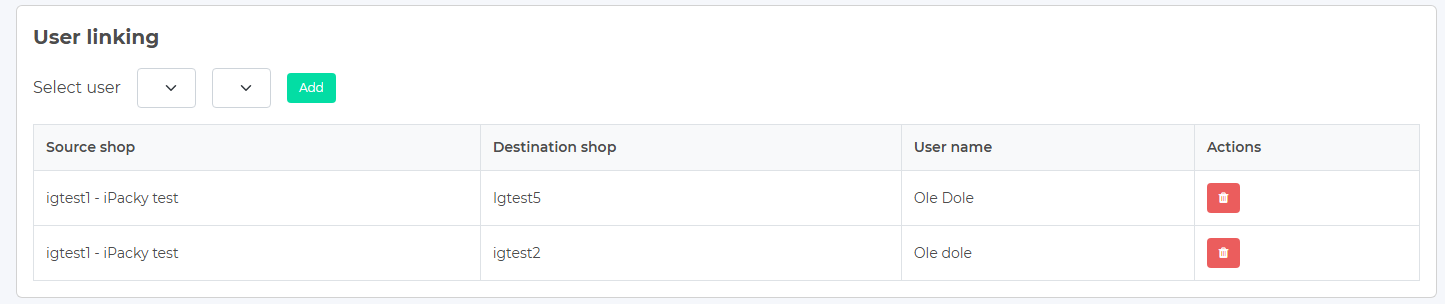
Here you see the User linking section.
In the Select user drop-downs, you will see the available stores, and the users in them.
- Only users that have the same role or lower than the logged-in user are available. This means that if you are logged in as a Supervisor, you can not link to a user with Administrator role.
- The user you edit can only be linked to one user per store. As soon as you have added a link to a user in one store, this store will disappear from the list of available stores. If you remove the link, the store will appear again.
- The user linking will automatically work both ways. So if you edit a user in another shop that this user is linked to, you will see the same link there.
- Delete a user link by clicking on the delete icon.
- You cannot link to disabled users. If a user is disabled after you made the link, you cannot switch to that store.
When a user that has user links is logged into the Dashboard, they will see a Switch shop entry in the Account menu in the top right corner. After clicking on that, you will see a list of shops you can switch to, based on the links you have created for that user.
If the user is not logging in through the Dashboard, but directly from Shopify, you can turn on the shop switching in Settings→Limitations→Allow shop switch outside the Dashboard. This will show an entry in the menu in the main screen in iPacky. This entry will be hidden if they log in through the Dashboard, and they have to do the shop switching there.