With the MyParcel connector, you can connect iPacky and MyParcel directly. This means that you don’t need to go into another app to create the shipping labels but get it directly after checking the order.
We recommend using one of our other shipping connectors if you can, since MyParcel has shown absolutely no interest in this, and it might stop working at any time. It’s also very limited how we can support this one.
When the order check in iPacky is complete, the shipping label will be printed instantly on your printer via the PrintNode connector.
In order to use this connector, you need to have a working MyParcel subscription. Get the API key from MyParcel and paste it into the API key as presented below.
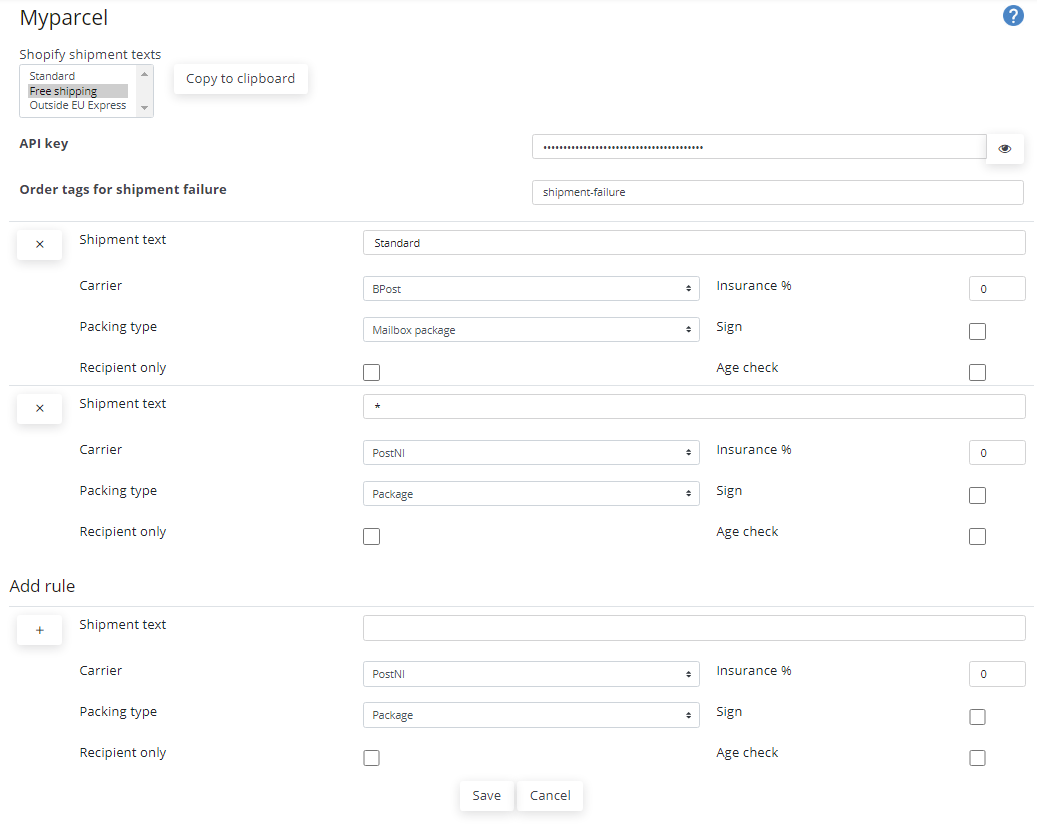
All rules, carriers, and other settings have to be set up:
- The Order tags for shipment failure can be used to set tags on the order if there is an error during label creation. Type in a tag and press Enter. It will also show a list of existing tags you can choose from after starting to type. Delete by clicking the X on an existing tag. After fixing and re-checking the order, these tags will be removed from the order.
- Shopify shipment texts will show a list of delivery types. These are all the available shipping rate texts in the Shopify admin. By selecting a text here and clicking on the Copy to clipboard, you can paste this text into the Shipment text. That way you will be sure not to make spelling mistakes. There might be texts that are not listed here, such as pickup at a store. The text for that will be different for each store. This text can be found on the order.
- To add a rule, fill in the fields in the Add rule section, click on the + button, and then click Save.
- To delete a rule, click on the X button.
Troubleshooting
- Check Check the API key is correct. If it works once, it should work forever unless you change the API key in MyParcel.
- The other common error is that the address is invalid. Make corrections on the order and check again.
- If the label is not printed, check that PrintNode is up and working and that the printer is turned on.
|
Field |
Explanation |
|---|---|
|
Shipment text |
The shipment delivery text selected at checkout on the order. The match must be exact and is case sensitive. Wildcards are not supported. A * (by itself) means that this rule will be applied when no match is found in the other rules. If this is not specified no rule processing will be performed if a matching rule is not found. |
|
Carrier |
Which carrier to use. |
|
Insurance |
Insurance in % of the order value. |
|
Packing type |
Specify packing type. |
|
Sign |
Whether or not a signature of recipient is required on delivery. |
|
Recipient only |
If only recipient can accept the delivery. |
|
Age check |
If a check of recipients age is required on delivery. Especially useful for orders that include items that has a age limit such as tobacco and alcohol. |